

MetaTrader 5 gives traders several ways to enter and manage positions, but understanding the difference between each order type can be confusing when you are just getting started. A Market Order, Buy Limit, Sell Limit, Buy Stop, and Sell Stop all work differently, and choosing the wrong order type can result in entering a trade at a price or under conditions you did not intend.
In this guide, we explain MT5 order types in simple terms, with practical examples to show when each order may be useful. You will learn how Market Orders and Pending Orders work, how Buy and Sell orders differ, and how Stop Limit orders can be used for more advanced entry strategies.
If you are still learning the basics of the platform, you can first read our complete MetaTrader 5 guide or our guide on how to use MT5.
What Are MT5 Order Types?
When you trade through MetaTrader 5, you can enter the market in several different ways.
The simplest option is a market order, which attempts to execute immediately at the available market price.
However, MT5 also supports pending orders that allow you to define specific price levels where you want a trade to be triggered.
Understanding these order types is essential because the order you choose determines when and under what conditions your trade is entered.
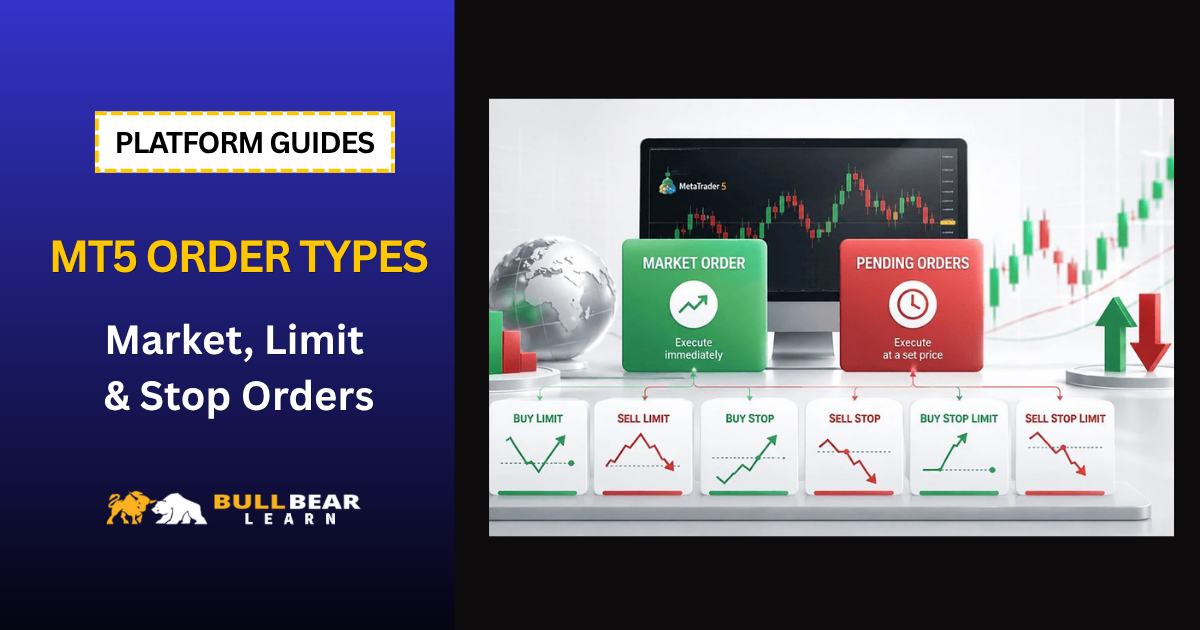
MT5 provides several major order types:
- Market orders
- Buy Limit
- Sell Limit
- Buy Stop
- Sell Stop
- Buy Stop Limit
- Sell Stop Limit
The platform also allows you to use Stop Loss and Take Profit with many orders.
If you are new to the platform, it is useful to first understand how to use MT5 before working with advanced order types.
Market Orders
A market order is designed to execute immediately at the best available price in the market.
For a Forex trader, there are two basic directions:
- Buy
- Sell
Buy Market Order
A Buy order is used when you expect the price of an instrument to rise.
For example:
EUR/USD is currently trading around 1.1000.
You believe the market will move higher and decide to enter immediately.
You submit a Buy order.
The broker attempts to execute the order at the available market price.
Sell Market Order
A Sell order is used when you expect the price to fall.
For example:
EUR/USD is trading around 1.1000.
You expect the market to decline and submit a Sell order.
Again, the order is executed at the available market price.
When Should You Use a Market Order?
Market orders are useful when your trading strategy requires immediate market exposure.
For example, you may use a market order when:
- A breakout has already occurred
- A confirmation signal has appeared
- You want immediate execution
- You are entering based on current market conditions
However, market orders have an important characteristic:
The exact execution price may differ from the price you see when submitting the order.
This difference can occur because of market volatility, liquidity, spreads, and execution conditions.
What Are Pending Orders?
A pending order allows you to specify conditions under which a trade should be opened.
Instead of entering the market immediately, you tell MT5:
“Open this trade if price reaches this level.”
This can be useful when you do not want to monitor the chart continuously.
MT5 supports four traditional pending order types plus two Stop Limit variations.
Buy Limit Order
A Buy Limit order is used when you want to buy at a price below the current market price.
For example:
Current EUR/USD price:
1.1000
You believe the market may fall toward 1.0950 and then potentially recover.
Instead of waiting for price manually, you could place:
Buy Limit: 1.0950
If the market reaches the specified level and the order conditions are met, MT5 can trigger the trade.
Example
Current price: 1.1000
Buy Limit: 1.0950
The logic is:
Price falls → reaches 1.0950 → Buy position is triggered
Buy Limit orders are commonly used for strategies involving:
- Support levels
- Pullbacks
- Retracements
- Mean reversion
Sell Limit Order
A Sell Limit order is the opposite.
It is used when you want to sell at a price above the current market price.
Example:
Current EUR/USD price:
1.1000
You believe price may rise toward resistance around 1.1050 before reversing.
You could place:
Sell Limit: 1.1050
The logic is:
Price rises → reaches 1.1050 → Sell position is triggered
Sell Limit orders can be useful around:
- Resistance
- Supply zones
- Retracement levels
- Reversal setups
Buy Stop Order
A Buy Stop is used when you want to buy at a price above the current market price.
This may seem counterintuitive at first.
Why would someone deliberately buy at a higher price?
The answer is usually breakout trading.
Suppose EUR/USD is trading at 1.1000.
You identify resistance at 1.1050.
Instead of buying before the breakout, you want to enter only if price moves above resistance.
You could place:
Buy Stop: 1.1050
The logic becomes:
Price rises → breaks the specified level → Buy order is triggered
This can be useful for:
- Breakout strategies
- Momentum trading
- Resistance breaks
- Trend continuation setups
Sell Stop Order
A Sell Stop works in the opposite direction.
It allows you to sell at a price below the current market price.
Suppose EUR/USD is trading at 1.1000.
You identify support around 1.0950.
You believe that if price breaks below this level, bearish momentum could increase.
You could place:
Sell Stop: 1.0950
The logic becomes:
Price falls → breaks the specified level → Sell order is triggered
Sell Stop orders are commonly associated with:
- Support breaks
- Bearish breakouts
- Momentum strategies
- Trend continuation
Buy Limit vs Buy Stop
This is one of the most important distinctions for beginners.
Suppose the current price is 1.1000.
Buy Limit
You want to buy below the current price.
Example:
Buy Limit = 1.0950
Your expectation:
Price falls → entry
Buy Stop
You want to buy above the current price.
Example:
Buy Stop = 1.1050
Your expectation:
Price rises → entry
A simple way to remember this:
Buy Limit = buy lower
Buy Stop = buy higher
Sell Limit vs Sell Stop
The same principle applies to Sell orders.
Current price:
1.1000
Sell Limit
You want to sell above the current price.
Example:
Sell Limit = 1.1050
Sell Stop
You want to sell below the current price.
Example:
Sell Stop = 1.0950
Remember:
Sell Limit = sell higher
Sell Stop = sell lower
Buy Stop Limit
MT5 also provides a more advanced order type called a Buy Stop Limit.
This combines characteristics of a Buy Stop and a Buy Limit.
The basic idea is:
- Price reaches the Stop level.
- The Stop Limit order becomes active.
- A Limit order is then placed at the specified limit price.
For example:
Current price: 1.1000
Buy Stop: 1.1050
Buy Limit price: 1.1040
If price reaches the Buy Stop level, MT5 activates the corresponding Buy Limit order.
The purpose is to give the trader more control over the acceptable entry price.
Sell Stop Limit
The Sell Stop Limit works in the opposite direction.
For example:
Current price: 1.1000
Sell Stop: 1.0950
Sell Limit price: 1.0960
If price reaches the Sell Stop level, the corresponding Sell Limit order becomes active.
This can be useful when a trader wants to participate in a breakout but does not want to accept an unlimited amount of price movement during execution.
However, Stop Limit orders are more complicated than standard pending orders and should be tested on a demo account before being used with real capital.
MT5 Order Types Comparison
| Order Type | Direction | Entry Relative to Current Price | Common Use |
|---|---|---|---|
| Market Buy | Buy | Immediately | Immediate bullish entry |
| Market Sell | Sell | Immediately | Immediate bearish entry |
| Buy Limit | Buy | Below current price | Pullback |
| Sell Limit | Sell | Above current price | Pullback |
| Buy Stop | Buy | Above current price | Breakout |
| Sell Stop | Sell | Below current price | Breakout |
| Buy Stop Limit | Buy | Stop trigger + limit | Controlled breakout entry |
| Sell Stop Limit | Sell | Stop trigger + limit | Controlled breakout entry |
Stop Loss and Take Profit
Order type determines how a position is entered.
Stop Loss and Take Profit determine what happens after the position is open.
Stop Loss
A Stop Loss is designed to close a position when price reaches a predefined level intended to limit the loss.
Take Profit
A Take Profit is designed to close a position when price reaches a predefined profit target.
For example:
Entry: 1.1000
Stop Loss: 1.0950
Take Profit: 1.1100
This creates a predefined trade structure before the position is opened.
For a detailed explanation, see our guide to Stop Loss and Take Profit.
How to Calculate the Risk Before Placing an MT5 Order
Choosing the correct order type is only one part of trade planning.
You also need to determine how much money you are willing to risk.
Important factors include:
- Account balance
- Risk percentage
- Entry price
- Stop Loss distance
- Pip value
- Position size
For example, if you decide to risk 1% of a $5,000 account, your maximum planned risk would be $50.
The next step is determining the appropriate position size for the distance between your entry and Stop Loss.
Our Position Size Calculator can help with this calculation.
You can also use the Pip Calculator to estimate the monetary value of pip movements.
Understanding Margin When Using MT5 Orders
Leverage allows traders to control positions larger than the amount of capital deposited as margin.
However, the fact that you can open a large position does not mean that you should.
Before submitting an order, understand:
- Required margin
- Available margin
- Free margin
- Margin level
- Potential loss
Our Margin Calculator can help estimate the margin requirement for a potential position.
How to Place a Pending Order in MT5
The exact interface can vary slightly depending on the MT5 version and broker.
Generally, the process is:
- Select the trading instrument.
- Open the New Order window.
- Choose the appropriate pending order type.
- Enter the desired price.
- Set Stop Loss if appropriate.
- Set Take Profit if appropriate.
- Select the expiration settings if available.
- Submit the order.
Always double-check the order direction and price before confirming.
Order Expiration
Some pending orders can have an expiration condition.
Depending on the available options, you may be able to specify:
- Good Till Canceled
- Specific date and time
- Other broker-supported expiration settings
An expiration time can be useful when your trading setup is valid only for a certain period.
For example, you may want a breakout order to remain active only during a particular trading session.
What Happens When a Pending Order Is Triggered?
When the market reaches the relevant trigger level, the pending order can become an active position.
However, the exact execution price is not always guaranteed.
During highly volatile markets, price may move rapidly through the requested level.
This can result in:
- Slippage
- Different execution price
- Partial execution in certain market environments
- Order rejection in specific circumstances
Execution depends on the broker, liquidity, market conditions, and order settings.
Pending Orders During Major News Events
Pending orders can be particularly risky around major economic announcements.
Suppose you place a Buy Stop just above resistance before an important central bank announcement.
The market may suddenly jump through the order level.
Your trade could therefore be executed at a significantly different price from the level you expected.
Before placing pending orders around major events, check the economic calendar and understand the potential volatility.
Common MT5 Order Mistakes
Confusing Buy Limit and Buy Stop
This is probably the most common beginner mistake.
Remember:
Buy Limit = below current price
Buy Stop = above current price
Confusing Sell Limit and Sell Stop
Remember:
Sell Limit = above current price
Sell Stop = below current price
Using the Wrong Position Size
The correct entry does not compensate for excessive risk.
Always calculate position size before submitting the order.
Ignoring Spread
Your entry price can be affected by the bid/ask spread.
This is particularly important for:
- Short-term strategies
- News trading
- Low-timeframe systems
- Instruments with wider spreads
Placing Orders Too Close to Current Price
Some brokers impose minimum distance requirements for certain orders.
If your pending order is too close to the current market price, MT5 may reject the order or require a different level.
Which MT5 Order Type Should Beginners Use?
There is no single order type that is appropriate for every strategy.
A beginner should first understand the logic behind each order.
Use a Market Order When:
You want immediate market exposure.
Use a Buy Limit When:
You want to buy after price pulls back to a lower level.
Use a Sell Limit When:
You want to sell after price rises toward a higher level.
Use a Buy Stop When:
You want to enter after an upside breakout.
Use a Sell Stop When:
You want to enter after a downside breakout.
Use Stop Limit Orders When:
Your strategy requires more precise control over the execution range and you understand how these orders behave.
A Simple Example
Imagine EUR/USD is trading at 1.1000.
You identify:
Support: 1.0950
Resistance: 1.1050
You could structure several different trading scenarios.
Scenario 1 – Buy the Pullback
Buy Limit:
1.0950
The idea is to buy if price falls to support.
Scenario 2 – Buy the Breakout
Buy Stop:
1.1050
The idea is to buy if price breaks above resistance.
Scenario 3 – Sell the Rejection
Sell Limit:
1.1050
The idea is to sell if price reaches resistance and your strategy signals a reversal.
Scenario 4 – Sell the Breakdown
Sell Stop:
1.0950
The idea is to sell if price breaks below support.
The order type should therefore reflect your trading thesis.
Order Type Does Not Replace a Trading Strategy
One of the biggest mistakes beginners make is thinking that choosing the correct order type automatically creates a good trade.
It does not.
Before placing an order, you should know:
- Why you are entering
- Where your entry is
- Where your Stop Loss is
- How much you are risking
- Where you expect to exit
- What would invalidate the setup
The order type simply determines how the trade gets executed.
Final Thoughts
Understanding MT5 order types is an essential part of learning how to use MetaTrader 5.
The most important distinctions to remember are:
Market Order → Enter now
Buy Limit → Buy below current price
Sell Limit → Sell above current price
Buy Stop → Buy above current price
Sell Stop → Sell below current price
Buy Stop Limit → Trigger a controlled Buy Limit after a Stop level is reached
Sell Stop Limit → Trigger a controlled Sell Limit after a Stop level is reached
Do not rush into advanced order types simply because they are available.
Start by understanding market orders and the four basic pending orders. Then gradually learn how Stop Limit orders work.
Most importantly, combine every order with proper risk management.
Before placing an MT5 trade, calculate your position size, understand the Stop Loss distance, check margin requirements, and consider whether upcoming economic events could create unusual volatility.
Once you understand these fundamentals, MT5 becomes much easier to use as part of a structured trading process.
Want to learn how to protect your MT5 trades? Continue with our guide to Stop Loss and Take Profit.
Looking for an MT5 broker? Compare regulation, spreads, commissions, account types, and trading conditions before opening a trading account.→ Best Forex Brokers